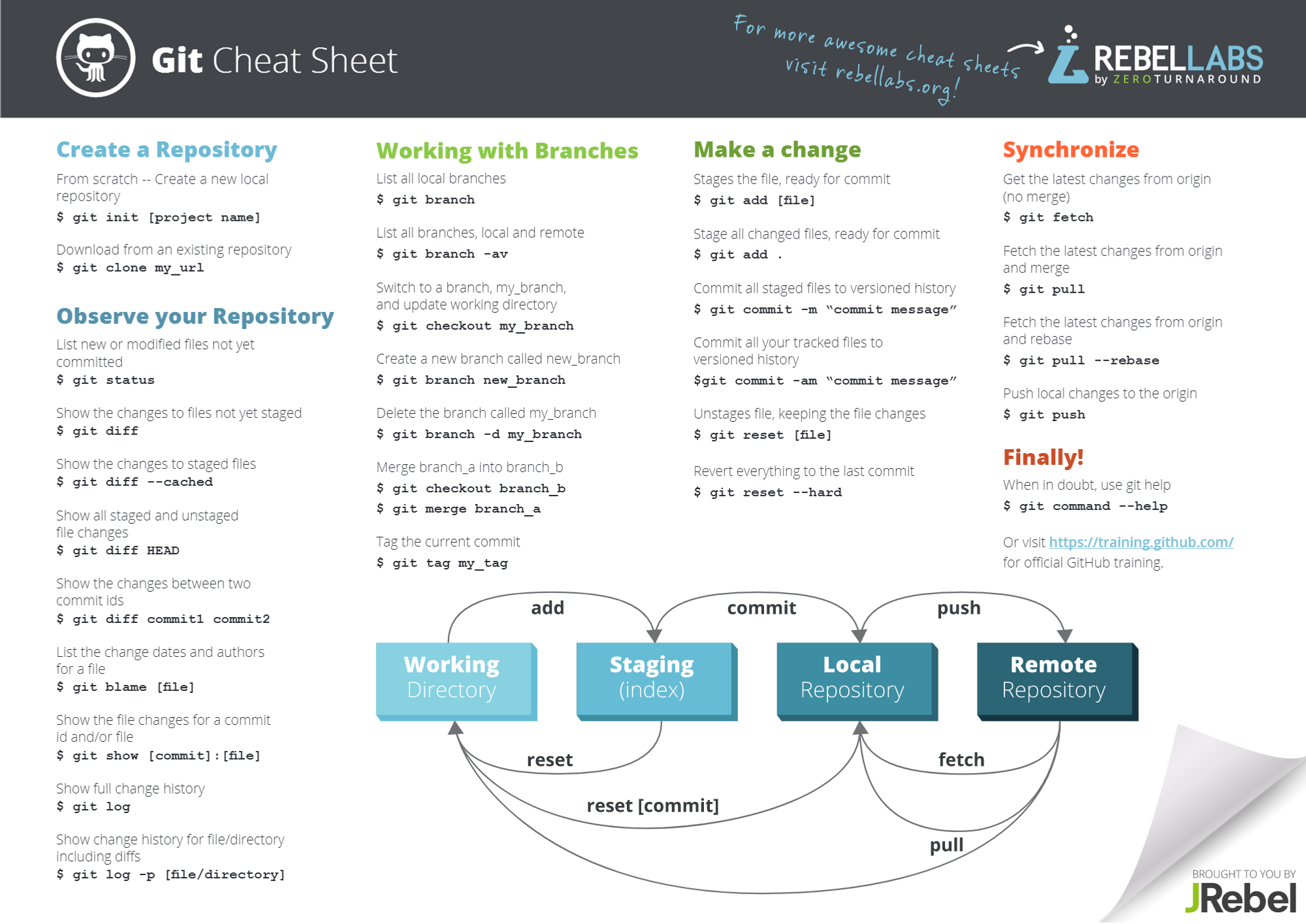
초보자를 위한 명령어 사이트 : https://12bme.tistory.com/47
'git' 카테고리의 다른 글
| [git] 원하는 log 버전으로 돌아가기 (0) | 2023.07.12 |
|---|---|
| [git] tag 관련 (0) | 2023.07.12 |
| [git] repogitory 없애기 (1) | 2023.07.12 |
| [git] commit 할 때 원하는 계정으로 설정하기 (1) | 2023.03.02 |
초보자를 위한 명령어 사이트 : https://12bme.tistory.com/47
| [git] 원하는 log 버전으로 돌아가기 (0) | 2023.07.12 |
|---|---|
| [git] tag 관련 (0) | 2023.07.12 |
| [git] repogitory 없애기 (1) | 2023.07.12 |
| [git] commit 할 때 원하는 계정으로 설정하기 (1) | 2023.03.02 |
$ git log 해서 나오는 코드를 copy

$ git checkout [copy한 코드]
| [git] 초보를 위한 참고자료 (0) | 2023.07.12 |
|---|---|
| [git] tag 관련 (0) | 2023.07.12 |
| [git] repogitory 없애기 (1) | 2023.07.12 |
| [git] commit 할 때 원하는 계정으로 설정하기 (1) | 2023.03.02 |
1. 동일 tag가 있다면서 tag 업데이트가 불가하다고 뜨는 경우
2. tag push
3. 원격 저장소의 tag 리스트 출력
| [git] 초보를 위한 참고자료 (0) | 2023.07.12 |
|---|---|
| [git] 원하는 log 버전으로 돌아가기 (0) | 2023.07.12 |
| [git] repogitory 없애기 (1) | 2023.07.12 |
| [git] commit 할 때 원하는 계정으로 설정하기 (1) | 2023.03.02 |
$ rm -rf .git
이제 이 디렉터리는 더 이상 Git 저장소로 관리되지 않습니다. 현재 상태를 확인하기 위해 git status 를 실행해봅니다.
$ git status
fatal: not a git repository (or any of the parent directories): .git
위 처럼 뜨면 완료
| [git] 초보를 위한 참고자료 (0) | 2023.07.12 |
|---|---|
| [git] 원하는 log 버전으로 돌아가기 (0) | 2023.07.12 |
| [git] tag 관련 (0) | 2023.07.12 |
| [git] commit 할 때 원하는 계정으로 설정하기 (1) | 2023.03.02 |
[WINDOW]
1.확인하는 방법
이름 : git config --global user.name
이메일 : git config --global user.email
2. 변경하는 방법
이름 : git config --global [user.name](<http://user.name>) [이름]
이메일 : git config --global [user.email](<http://user.email>) [이메일]
이메일 : git config --local [user.email](<http://user.email>) [이메일]
(+) git 계정의 설정을 확인하고 싶다면 git config --list
[Ubuntu]
push 작업 이전에 다음 실행
git config --global user.name "qqoqob"
git config --global user.email "aaa@naver.com"
| [git] 초보를 위한 참고자료 (0) | 2023.07.12 |
|---|---|
| [git] 원하는 log 버전으로 돌아가기 (0) | 2023.07.12 |
| [git] tag 관련 (0) | 2023.07.12 |
| [git] repogitory 없애기 (1) | 2023.07.12 |